V VOX Tool Plugin Auto para Last War: Survival Game
Última Guerra: Sobrevivência · Assistente de plug-in de script automatizado 1,330 Online

Ferramenta VOX: Last War: Assistente de plug-in de script de automação de sobrevivência

Online e seguro Estável há 500+ dias

Varredura de mapas, coleta de recursos, captura de missões furtivas, montagem automática, automação completa diária: mais de 50 funções, rodando Windows 7×24, sem necessidade de ficar na frente do computador.

Disponível apenas em Lastwarvoxbot.com — não há outro canal de lançamento.

Ferramenta VOX: Last War: Assistente de plug-in de script de automação de sobrevivência
50+Introdução de Recursos
7Idioma
60+Recursos automatizados
12Idiomas
WindowsPlataformas
24/7Roda sem você

Prévia da interface da ferramenta

Demonstração interativa do painel (apenas visual)

VOX Tool Plugin v0.3.38 ✕

Profile

Account, subscription and notices
Account
User5454545454
Expires2026-10-23 12:08
PlanUltra
Notice
【Aviso de atualização e feedback】

Caros jogadores: uma nova versão do nosso plugin está disponível. Veja os pontos principais desta atualização:

Progresso: a maioria dos recursos principais está pronta. Alguns recursos novos ainda estão sendo ajustados.

Feedback: como as condições de teste no jogo são rígidas, alguns recursos podem falhar em ambientes complexos. Fale com o suporte quando precisar.

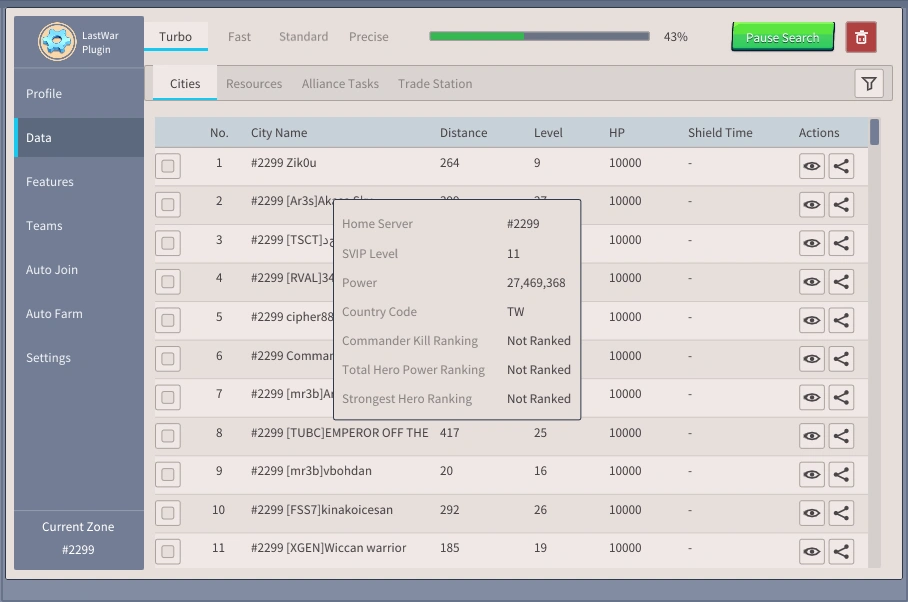
Data

Live scan results for this game instance
0%
▼
No.City NameDistanceLevelHPShield TimeActions
1 #2299 Commander 42ec42299 291 8 10000 - ◉↗
2 #2299 Commander 2aec82299 190 3 10000 - ◉↗
3 #2299 Comandante 41d082299 686 6 10000 - ◉↗
4 #2299 Comandante420f22299 196 3 10000 - ◉↗
5 #2299 [FanC]Meomeomeo90 421 26 10000 - ◉↗
6 #2299 41babylon 300 10 10000 - ◉↗
7 #2299 [LDP]Kai 417 25 10000 - ◉↗
8 #2299 [RVA]Nova 288 17 10000 - ◉↗
9 #2299 Commander Liu 355 12 10000 - ◉↗
No.ResourceDistanceLevelGatheringActions
1 金礦 16 7 Gathering ◉↗
2 金礦 29 7 Idle ◉↗
3 金礦 16 5 Gathering ◉↗
4 金礦 35 5 Idle ◉↗
5 農田 21 6 Idle ◉↗
6 農田 28 5 Idle ◉↗
7 金礦 37 7 Idle ◉↗
8 金礦 43 5 Idle ◉↗
9 農田 290 10 Gathering ◉↗
10 礦井 27 6 Idle ◉↗
11 農田 330 8 Gathering ◉↗
No.Character NameRarityLevelStolenCompletion TimeItemsAutoActions
1 manrou SP Orange 4 0 03:31:17 x1299+ ▶ ▢◉↗
2 نینسی وحید قزلباش‌ SP Orange 2 0 03:12:34 x699+ ▶ ▢◉↗
3 Dri2 SP Orange 5 0 00:02:27 x1599+ ▶ ▢◉↗
4 ShogunWarrior SP Orange 3 0 03:24:07 x999+ ▶ ▢◉↗
5 RezaTeD SP Orange 2 0 00:02:20 x699+ ▶ ▢◉↗
6 ChopYoFace SP Orange 4 0 01:52:33 x1299+ ▶ ▢◉↗
7 32oAHMED SP Orange 5 0 03:43:51 x1599+ ▶ ▢◉↗
8 PioChiken SP Orange 5 0 02:04:47 x1599+ ▶ ▢◉↗
9 Mr CRAB5 SP Orange 4 0 00:19:25 x1299+ ▶ ▢◉↗
10 ʞlɐ ɒ SP Orange 5 0 01:39:05 x1599+ ▶ ▢◉↗
No.MissionRarityLevelProgressCompletion TimeItemsAutoActions
No.IconOwnerAllianceCountCombat PowerItemsActions
1 Abed dabbagh GlaD 1 7.7M x1x1 +4 ◉↗
2 Juice748 FRRL 0 2.8M x1x1 +7 ◉↗
3 Skies AKUTA Ar3s 1 13.0M x1x1 +4 ◉↗
4 ngeriiiiiiiiiiiiii CATS 1 1.0M x199+ +3 ◉↗
5 Gege0002 FrNd 0 4.2M x1x1 +4 ◉↗
6 Commander 23bde2297 FFTD 1 1.2M x1x20 +4 ◉↗
7 CommanderScore FrNd 0 6.2M x1x1 +6 ◉↗
8 hihihihiiiiiiiii TSCT 0 3.6M x1x1 +6 ◉↗
9 Secrète Légende TUBC 0 3.9M x6099+ +3 ◉↗
10 RAIDblack AraS 0 3.0M x4099+ +3 ◉↗
No.AllianceURCountShield TimePowerAutoActions
1 TSCT NO 0 00:01:54 12.9M / 9.4M / 7.0M ◉↗
No.MonsterDistanceLevelShield TimeActions
1 Boss末日巡邏者 597 190 - ◉↗
2 Boss喪屍首領 374 10 - ◉↗
3 Boss喪屍首領 334 30 - ◉↗
4 Boss末日精英 401 14 - ◉↗
5 Boss末日精英 428 6 - ◉↗
6 Boss元帥衛隊 142 4 - ◉↗
7 Boss末日精英 366 26 - ◉↗
8 Boss末日精英 32 17 - ◉↗
9 Boss末日精英 44 4 - ◉↗
10 Boss末日精英 351 22 - ◉↗
11 Boss末日精英 12 24 - ◉↗
No.NameItemsCompletion TimeAuto
1 Tina taji x199+x9 -
2 NANDOSCP x199+99+ -
3 Gl17chd x1x3299+ -
4 Daicadacbiet x199+x11 -
5 1313136913 x199+99+ -
6 1313136913 x199+x11 -
7 1313136913 x199+x20 -
8 Commander 448072299 x199+x20 -
9 Warleader07 x699+x82 00:49:54
10 Kommandant42f612299 x199+x11 -
No.ItemPriceStockDistanceRefreshActions
1 Speed Up 60m 89,000 12 12 01:20:15 ↗
2 Resource Pack L 320,000 30 8 01:20:15 ↗
3 Shield 8h 150,000 5 25 01:20:15 ↗
4 VIP Points 1k 260,000 9 6 01:20:15 ↗
5 Teleport 60,000 3 6 01:20:15 ↗
6 Speed Up 8h 640,000 2 55 01:20:15 ↗

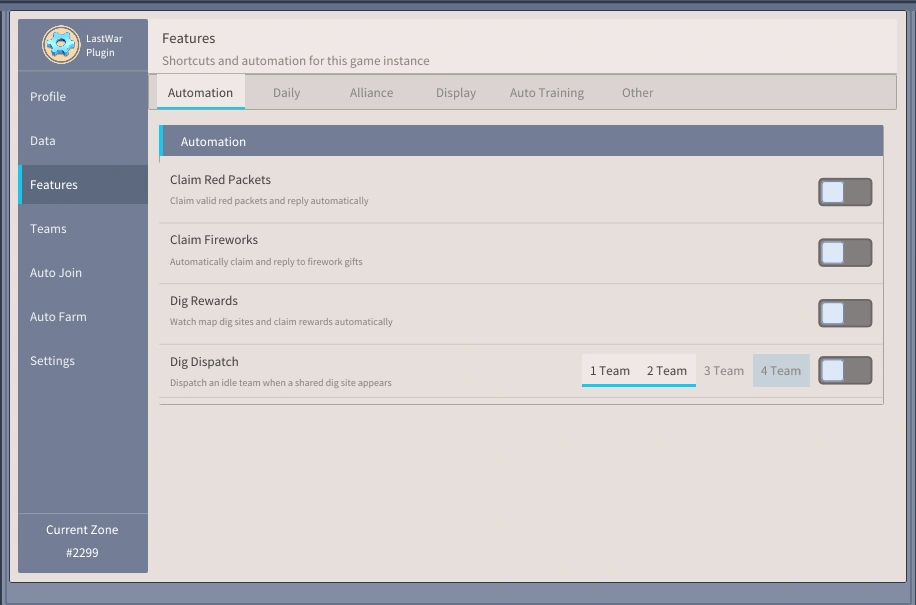
Features

Shortcuts and automation for this game instance
Automation
Claim Red PacketsClaim valid red packets and reply automatically
World chat claim delayWait after receiving a world chat golden egg or red packet (ms)
Alliance chat claim delayWait after receiving an alliance chat golden egg or red packet (ms)
Reply TextChat message sent after a successful claim
ty☺
Reply DelayMilliseconds to wait before replying after a successful claim
Ignore Birthday GiftsIgnore birthday red packets
Claim FireworksAutomatically claim and reply to firework gifts
Claim DelayMilliseconds to wait after finding a fireworks gift
Reply TextChat message sent after claiming fireworks rewards
ty☺
Reply DelayMilliseconds to wait before replying after a successful claim
Dig RewardsWatch map dig sites and claim rewards automatically
Claim DelayNegative claims early; positive claims late; network latency is included
Filter Unshared Dig SitesOnly claim dig rewards explicitly shared in chat
Reply TextChat message sent after confirming your claim
ty☺
Reply DelayMilliseconds to wait before waiting after confirming your claim
Dig DispatchDispatch an idle team when a shared dig site appears
Dispatch DelayMilliseconds to wait after finding a shared dig site
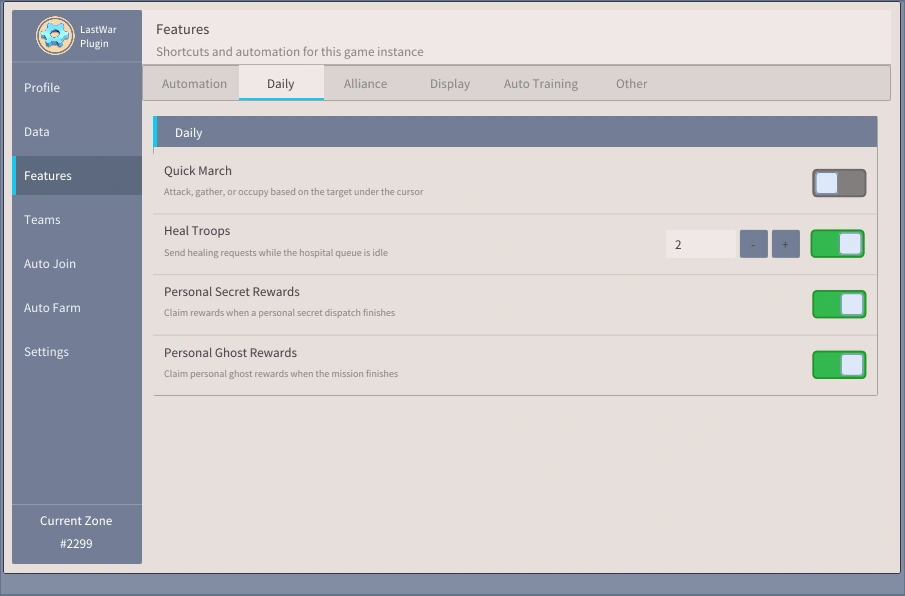
Daily
Quick MarchAttack, gather, or occupy based on the target under the cursor
Heal TroopsSend healing requests while the hospital queue is idle
Personal Secret RewardsClaim rewards when a personal secret dispatch finishes
Personal Ghost RewardsClaim personal ghost rewards when the mission finishes
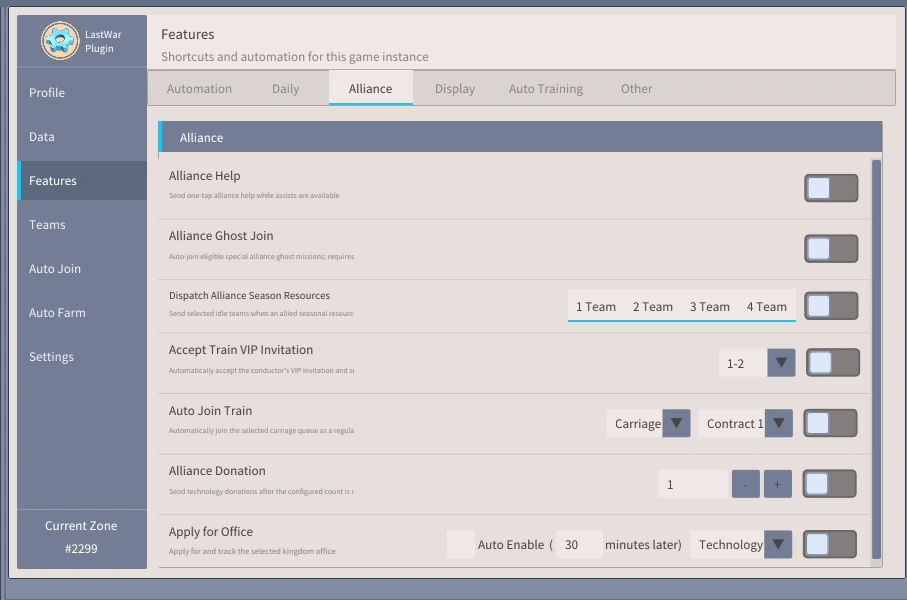
Alliance
Alliance Ghost JoinAuto join eligible special alliance ghost missions; requires VIP.
Dispatch Alliance Season ResourcesSend selected idle teams when an allied seasonal resource appears
Dispatch DelayWait after detecting an allied resource point (ms)
Accept Train VIP InvitationAutomatically accept the conductor's VIP invitation and select
Auto Join TrainAutomatically join the selected carriage queue as a regular passenger
CarriageContract
Alliance DonationSend technology donations after the configured count is reached
Apply for OfficeApply for and track the selected kingdom office
Auto Enable (minutes later)
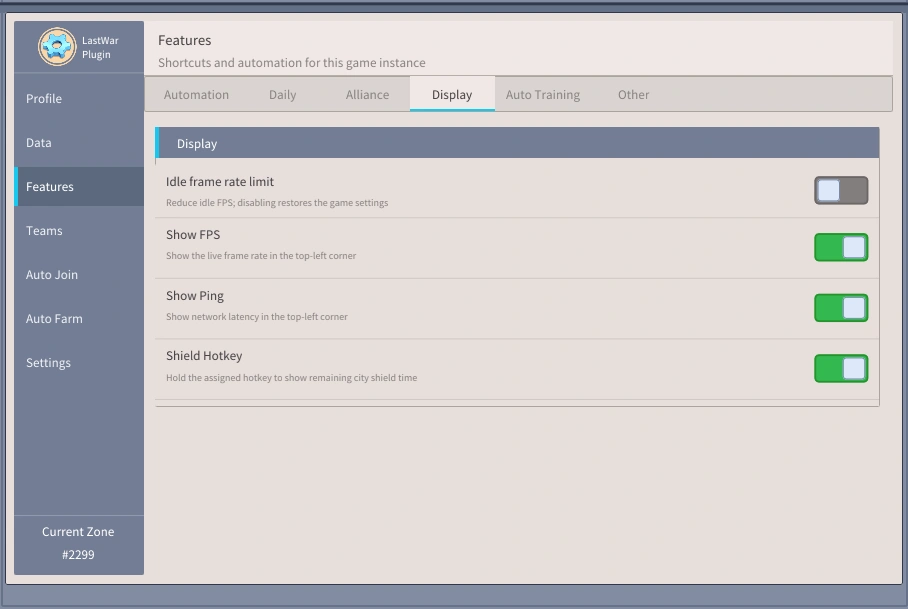
Display
Idle frame rate limitReduce idle FPS, disabling restores the game settings
FPS limit15-240 FPS, a high limit keeps the game original behavior
15 FPS
Show FPSShow the live frame rate in the top-left corner
Show PingShow network latency in the top-left corner
Shield HotkeyHold the assigned hotkey to show remaining city shield time
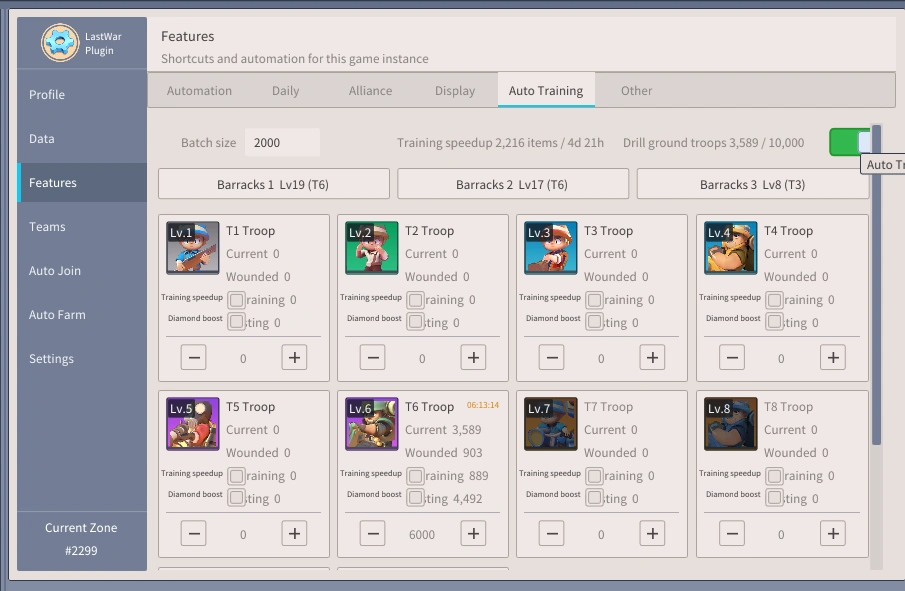
Auto Training
Batch size Training speedup 2,353 items / 5d 8h Drill ground troops 6,778 / 10,000
Barracks 1Lv19 (T6)
Barracks 2Lv17 (T6)
Barracks 3Lv8 (T3)
T1 Troop
Current 0
Wounded 0
T2 Troop
Current 0
Wounded 0
T3 Troop
Current 378
Wounded 0
T4 Troop
Current 0
Wounded 0
T5 Troop
Current 0
Wounded 0
T6 Troop05:53:54
Current 6,400
Wounded 0
T7 Troop
Current 0
Wounded 0
T8 Troop
Current 0
Wounded 0
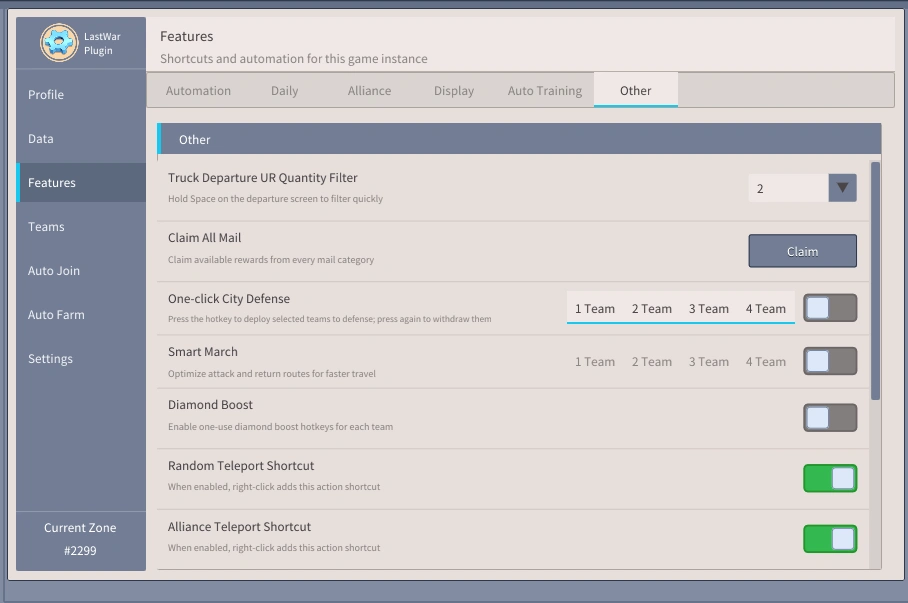
Other
Truck Departure UR Quantity FilterHold Space on the departure screen to filter quickly
Claim All MailClaim available rewards from every mail category
One-click City DefensePress the hotkey to deploy selected teams to defense; press again to withdraw them
Smart MarchOptimize attack and return routes for faster travel
March Confirmation TimeoutWait for the game to return march status, in milliseconds
Minimum Time ThresholdSmart March will not activate when the march time is below this value
Diamond BoostEnable one-use diamond boost hotkeys for each team
Random Teleport ShortcutWhen enabled, right-click adds this action shortcut
Alliance Teleport ShortcutWhen enabled, right-click adds this action shortcut
Arrow-key CameraWorks only in the world map
Move RateWorld-coordinate distance moved per key press
Position WatchOpen the position watch interface
Auto Shield on AttackUse the selected shield once when a real city attack is detected
Auto Zombie Bus SupportAutomatically send an enabled event team to garrison an allied city announced in alliance chat
Action delayWait after receiving a bus support target (ms)

Teams

View team status, targets and members
Teams 2 / 2
Team 1 Live Status
Current StatusIdle
Time Left--
Team Power3.19M
Action Energy130 / 120
Current Position(261, 749)
Target Position--
Action Details--
Dispatch StatusDispatchable
Automation Diagnostics
Current TaskNone
Execution StageWaiting for Task
Final Target--
Smart MarchInactive
Worker Position#2299 (261, 749)
Current Game Target--
Waiting ReasonWaiting for a task matching setti
Last Error--
All Teams ▾
Current Plan ▾
不動戦士-墨菲Power 491.4K
11111 ▾
軍團之刃-馬歇爾Power 447.8K
Custom ▾
参謀-莫妮卡Power 394.4K
Custom ▾
狂暴射手-梅森Power 368.6K
Custom ▾
冰封女神-艾丽莎Power 248.5K
Custom ▾

Auto Join

Match joinable targets by monster name and level
Join Strategies+
末日精英1/2/3/4 Team  Lv.1-999  Members >=…
✕
Strategy Settings

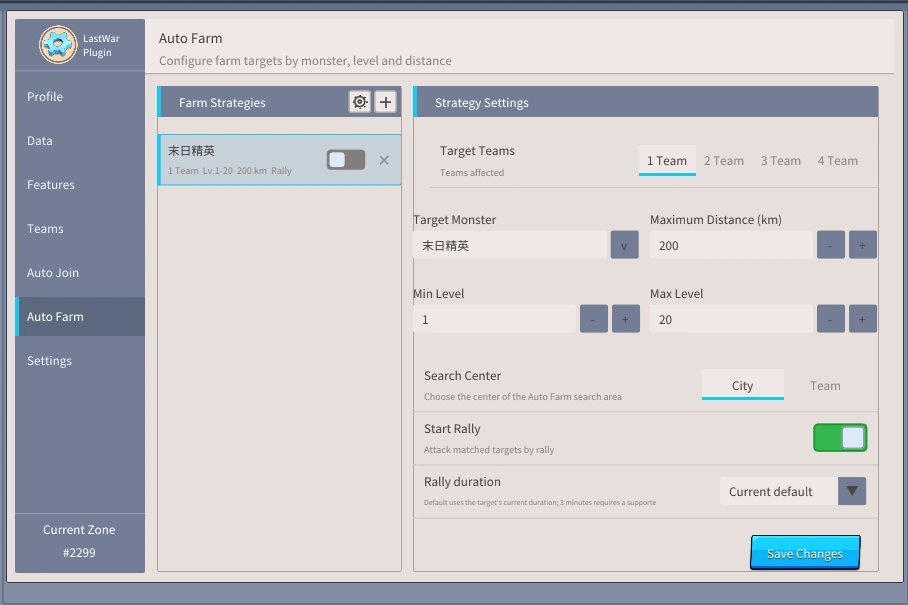
Auto Farm

Configure farm targets by monster, level and distance
Farm Strategies+
入侵丧屍1 Team  Lv.1-20  200 km  Rally
✕
Strategy Settings

Settings

Only affects this game instance
Interface
LanguageChoose the plugin display language
▾
UI ScaleCurrent 173%
50%100%200%
Map Search
Fast SearchThread Count
Standard SearchThread Count
Precise SearchThread Count
General Delay
Early thresholdms
Late thresholdms
Hotkeys (Delete: clear, Esc: cancel)
Toggle Control CenterShow or hide the plugin control center
InsertNot set
Team 1 Quick MarchQuickly dispatch Team 1 to the target under the cursor
QNot set
Team 2 Quick MarchQuickly dispatch Team 2 to the target under the cursor
WNot set
Team 3 Quick MarchQuickly dispatch Team 3 to the target under the cursor
ENot set
Team 4 Quick MarchQuickly dispatch Team 4 to the target under the cursor
RNot set
Return Team 1Recall Team 1 immediately
ANot set
Return Team 2Recall Team 2 immediately
SNot set
Return Team 3Recall Team 3 immediately
DNot set
Return Team 4Recall Team 4 immediately
FNot set
Team 1 Diamond Boost 50%Use one 1,000-diamond boost on marching Team 1
Shift+QNot set
Team 2 Diamond Boost 50%Use one 1,000-diamond boost on marching Team 2
Shift+WNot set
Team 3 Diamond Boost 50%Use one 1,000-diamond boost on marching Team 3
Shift+ENot set
Team 4 Diamond Boost 50%Use one 1,000-diamond boost on marching Team 4
Shift+RNot set
Team 1 Diamond Boost 25%Use one 600-diamond boost on marching Team 1
Not setNot set
Team 2 Diamond Boost 25%Use one 600-diamond boost on marching Team 2
Not setNot set
Team 3 Diamond Boost 25%Use one 600-diamond boost on marching Team 3
Not setNot set
Team 4 Diamond Boost 25%Use one 600-diamond boost on marching Team 4
Not setNot set
Global Equipment Plan 1Quickly apply selected global equipment plan 1
▾Not setNot set
Global Equipment Plan 2Quickly apply selected global equipment plan 2
▾Not setNot set
Global Equipment Plan 3Quickly apply selected global equipment plan 3
▾Not setNot set
Global Equipment Plan 4Quickly apply selected global equipment plan 4
▾Not setNot set
Global Equipment Plan 5Quickly apply selected global equipment plan 5
▾Not setNot set
Random TeleportUse a random relocation item
Not setNot set
Alliance TeleportUse an alliance relocation item
Not setNot set
Claim All MailPress the hotkey to claim all mail
XNot set
One-click City DefensePress the hotkey to assign every team to city defense
PNot set
Shield HotkeyHold to show city shield time on screen
SpaceNot set
Move Camera LeftHold to keep moving the world camera left
LeftNot set
Move Camera RightHold to keep moving the world camera right
RightNot set
Move Camera UpHold to keep moving the world camera up
UpNot set
Move Camera DownHold to keep moving the world camera down
DownNot set
Configuration
Import / Export ConfigurationCopy configuration to the clipboard or import it from the clipboard

* Apenas demonstração visual; recursos variam por versão

Funções principais continuam a ser adicionadas

Caixa de ferramentas completa: combate de precisão, digitalização de imagens completas, tarefas e atividades e automação diária.

Nas duas versões Exclusivo do premium
Novo · Várias versões

Plataforma de corrida · Multi

  • Um computador executa várias contas em paralelo: o cartão mensal padrão inclui 2 ou 5 janelas de jogo.
  • Start Center: painel de configuração do jogo, clique duas vezes para iniciar
  • Cada janela possui uma conta, dados independentes e sem conflitos entre contas.
  • Todas as funções de automação funcionam em paralelo e cada janela é independente uma da outra

Multiaberto: um computador pode executar várias contas ao mesmo tempo

1
Ver tudo · 50 recursos

Recursos marcados como Premium exigem um plano pago.

Tiro real da interface

Interface escura, simples e fácil de usar, cada função pode ser ligada e desligada com um clique.

Ferramenta VOX
Ferramenta VOX
Ferramenta VOX-2
Ferramenta VOX-2
Ferramenta VOX-3
Ferramenta VOX-3
Ferramenta VOX-4
Ferramenta VOX-4
Ferramenta VOX-5
Ferramenta VOX-5
Ferramenta VOX-6
Ferramenta VOX-6
Ferramenta VOX-7
Ferramenta VOX-7
Ferramenta VOX-8
Ferramenta VOX-8

Exibição de vídeo

Vídeo de demonstração de função e instruções de instalação

Vídeo de demonstração
Ataque os zumbis invasores
Ataque rápido QWER
Junte-se automaticamente

Preços

Teste grátis por 30 dias. Faça upgrade para Premium semanal ou mensal quando quiser.

Ordem de experiência

Versão gratuita

Grátis /1 horas

Experimente funções básicas gratuitamente por 1 hora sem pagar.

  • Mostrar FPS, PING, escudos (Space)
  • Todos os recursos incluídos
Grátis
POPULAR

Premium

53 USD /30 dias

Todos os recursos liberados. Automação máxima. Suporte prioritário.

  • Contém todas as funções da versão regular, 2 janelas e 5 janelas
  • Scanner: Cidade/Recursos/Zumbis/Missões Furtivas/Missões de Aliança
  • Auto farm: combate / rally / equipamento / cura / stamina / treino
  • Automático diário: correio/trem/ovo dourado/fogos de artifício/envelope vermelho/evento
  • Posição: Posição da Aliança de Campanha/Aprovação + Suporte Prioritário TG
Comprar
vender como bolos quentes

Versão normal

39 USD /30 dias

Contém múltiplas janelas, adequadas para pessoas com poucos requisitos funcionais.

  • Contém funções básicas (incluindo janelas de jogo com 2 e 5 janelas abertas)
  • Scanner: Cidade/Recursos/Zumbis/Missões Furtivas/Missões de Aliança
  • Rally automático: rally/equipar/curar
  • Automático diário: correio/trem/ovo dourado/fogos de artifício/envelope vermelho/evento
  • Posição: Posição da Aliança de Campanha/Aprovação + Suporte Prioritário TG
Comprar

Preços apenas para referência. Contacte-nos para o valor atual.

Perguntas frequentes

A ferramenta VOX é segura? A conta será banida?

A ferramenta VOX é executada em seu próprio computador e opera sob sua própria conta. Muito seguro. Além de caro, o nosso é 100% seguro.

Como começar?

PC/multi-versão: Baixe a ferramenta → abra e registre sua própria conta → carregue automaticamente o caminho do jogo → clique em "Iniciar Jogo".

Preciso executar como Administrador?

Normalmente não: o app não pede Administrador, então não aparece UAC. Execute como Administrador apenas se o jogo não abrir pelo app, se estiver em pasta protegida como C:\Program Files, ou se você já roda o jogo como Administrador.

Posso usar várias contas de jogo?

Sim. A versão Multi abre cada conta em sua própria janela; o máximo de janelas é igual aos slots de UID da chave. A conta principal não consome slot extra.

Em quais dispositivos ele pode ser executado?

Windows 10/11 (versão de janela única para PC ou versão de múltiplas janelas).

As atualizações são gratuitas? Qual é a política de reembolso?

Atualizações gratuitas em tempo real - após reiniciar o aplicativo, ele comparará automaticamente a versão com o servidor e atualizará. Recomenda-se uma avaliação experimental; reembolsos não são suportados após a compra.

Pronto para rodar auto 24/7?

Baixe, abra e clique em Iniciar Jogo. Atualizações gratuitas para sempre.

Baixar
Grupo TG Suporte